Record a reliable first take
Choose the microphone, run a short test, and capture the session in the browser. Keep the microphone position and room consistent when the project spans multiple sessions.
Capture long-form narration, find pickups in the transcript, keep chapters organized, and finish spoken audio in one browser workflow.

See it in action
Three screens from the Hilite app you'll spend most of your time in.
Start a clean take without installing traditional recording software.
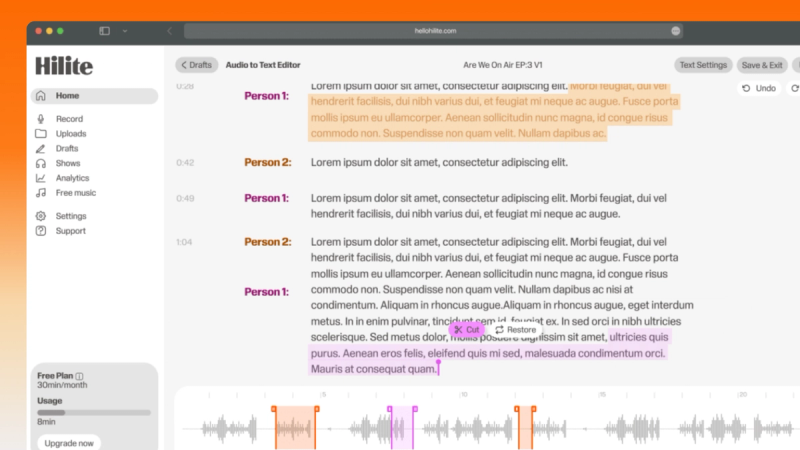
Use the transcript to remove false starts, pauses, and repeated lines.
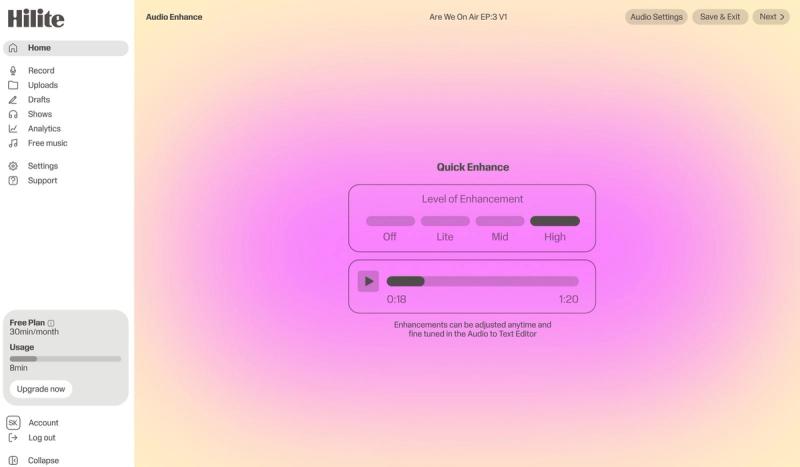
Improve spoken-word clarity and prepare the recording for its destination.
The problem
How it works
Choose the microphone, run a short test, and capture the session in the browser. Keep the microphone position and room consistent when the project spans multiple sessions.
Search the text, remove mistakes, tighten pauses, and make pickups without hunting through an unfamiliar waveform.
Reduce distracting background noise and even out the listening experience while preserving the character of the voice.
FAQ
If your question is not here, the support team replies within one business day.